Author: ramandeepsinghlongia

  • YouTube SnoopaVision – Watch Each & Every Video In 3D

    YouTube SnoopaVision

    What Is YouTube SnoopaVision?

    As YouTube is a site by which everyone can see the video. Now days it is a most popular site for sharing or watching anything. Basically, it is a free video sharing website in which everyone can share their videos also and you can see all the videos online. It can be a song a dance or a serial, movie trailer and many more things.

    YouTube has million numbers of videos. It just uploads videos in every minute. YouTube SnoopaVision is popular because it has every kind of videos whatever you want. Now YouTube is very excited to tell you that we have discovered and have innovated a new feature that is you can watch every video in 360 spherical. People were asking for this since so long so they have launched this new product. YouTube Snoop Vision  So this is a very new product that you can see video in 360 through SnoopVision as technology is going wider. In order to upload a 360 degree video file, you’ll need to modify the file with an app or script before uploading. YouTube Snoop Vision will be going to an immersive experience. Now the viewers can see the thing which was impossible earlier like the stage and the crowd of the concert which you want to see, the sky and the ground as you wing suit glide, or you could even have a choose-your-own-adventure video where people see a different story depending on where they look. You know how this will get possible only because of 360 degree video uploads. The best part is that you can watch these videos in your phone and tablets also. YouTube has downloaded it so that creators can give their viewers a unique video experience. YouTube now supports 360-degree videos (YouTube SnoopaVision). While the selection of currently available videos is limited, the technology is exciting nevertheless. Look for the number of these videos to explode as 360-degree. It is new way to share and see your world. Now you can watch all your videos on the existing YouTube app for Android, and by moving the phone or tablet around they’ll see all the different angles while the video plays. So this new invansion of YouTube SnoopaVision is speechless and unpredictable.


  • wwwpromoter review with Payment Proofs – CPC and CPM Network

    wwwpromoter review with Payment Proofs – CPC and CPM Network

    wwwpromoter review with payment proof

    wwwpromoter review with Payment Proofs – CPC and CPM Network


    Wwwpromoter Review:
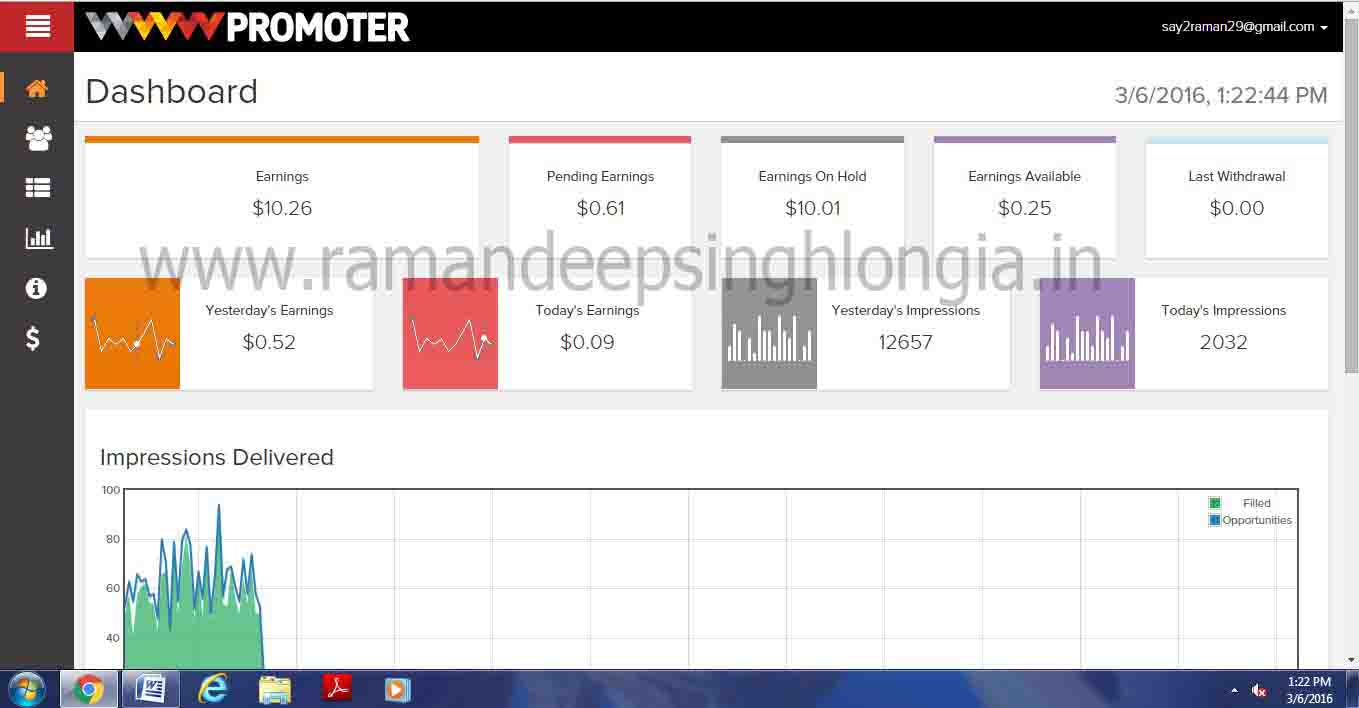
    Wwwpromoter is a trusted website I must say. Before using this website I read some reviews about it and all the reviews which I read were positive reviews so at last I decided to check this website myself and after reading all the review I decided to work with it. And I must say that the reviews which I read were actually true and Wwwpromoter is a trusted website now I can say that. Although the payout of this website is not like Google Adsense but still the payout of Wwwpromoter is above average and good. Needless to say that you need a certain amount of minimum visitors but the site is totally trustable. You need monthly visitors of around 1000 and which are very average. So in the end I would like to say that Wwwpromoter is a trustable website and you can easily bank on this website.
     

    Conclusion:
    Now i saw that wwwpromoter cpm rate is very low but it’s better than to join scam network. Like adhitz scam network. So please don’t waste your valuable traffic on those types of scam networks. WWWpromoter is a very good networks if your site is related to movies, songs, torrent, software, or games.  Use wwwprmoter and choose yourself it’s valuable or not.

    wwwpromoter Paymet Proofs

    wwwpromoter payment proof

    wwwpromoter Paymet Proof Paypal

    wwwpromoter Paymet Proof dashboard with cpm rate

    wwwpromoter Earning proof with CPM Rate

    wwwpromoter Paymet Proofs Dashboard

    wwwpromoter earning Proofs Dashboard

    wwwpromoter Review (Some More details)

    AD Type  CPA, CPC,CPM, CPV
    Account Manager Lena liu. Skype: wwwpromoter.steven
    Minimum Payment $10
    Frequency of Payment Net-15
    Payment Method  Paypal


    Click Here to Sign Up 

  • Best Top 5 Free Video Converter Software For Windows

    Best Top 5 Free Video Converter Software For Windows

    Best Top 5 Free Video Converter Software For Windows

    In today’s hectic life we deal with many issues which baffle us. Getting stuck with our important videos is one of those. We record videos, share videos, store videos. Many times we record with our phones. Sometimes we prefer to use our camera and other such devices. After recording, we consider them to store. We try to shift all of them to one place. Oops! ‘Format is not supported?’ We usually face this problem and to solve this problem we need to change our videos to a compatible format which can be read by all the devices whether our mobile phones, windows, Linux or Mac. In order to change the format of our essential videos we require a good video converter. Today, here I’ll be giving you suggestions about video converters which you may use to convert your video stuffs. List as follows:

     1. HANDBRAKE – We stumble upon many but give this tool the first place. This software works very smooth and not only it does the job of video converting but it has many other features and functions as well. Handbrake can perform converting and transcoding. It is free and has potential to work cross platform. HANDBRAKE is also a DVD ripping tool. Which gives it reason to be rated high.

    HANDBRAKE

     2. Freemake Video Converter – Another we have here is a completely free tool which can convert videos for you in many different formats. It has more than 200 possible converting format options. Freemake video converter has a clean and nice interface which allows us to easily convert videos. This software is highly customizable according to your needs. It comes with many other things to perform as well, which might be useful for you. It supports windows platform.

    Free Make Video Converter

     3. MPEG Streamclip – A fast and flexible video converter for windows. MPEG Streamclip has unique set of options. It has a video player also but for converting purpose. MPEG Streamclip allows you to do more than just converting; it can copy, paste and trim your videos. It is swift in its job and is popular among the users.

    MPEG Streamclip

    4. Format Factory – As the name suggests it is highly abandoned in formats. Format Factory gives you complete freedom to convert your videos and  It primarily  supports the MPG, MP4, MP3, AVI, 3GP, OGG, BMP, TIF, TGA, ICO, WMA, SWF, FLV, JPG, WMV and a lot more format options. Format Factory has an option to reduce the file size also. It is the richest tool in this category.

    Format Factory

    5. SUPER  – Lastly in the category we have an underrated tool to convert your videos. It probably doesn’t have the clean interface but it performs very well as far as the trans-coding of the videos is concerned. SUPER is free entirely and has a number of advanced setting which gives you grip on your videos. It has some powerful and effective options which make it stand apart in the category. SUPER has everything or perhaps more than that you’ll ever need.

    Next time you ever are struggling with your videos to convert them. Do consider upon the soft wares motioned in the above.

  • Top 5 Best Free Mobile Recharge Apps For Android Devices

    Top 5 Best Free Mobile Recharge Apps For Android Devices

    Top 5 Best Free Mobile Recharge Apps For Android Devices

    Are mobile phones billing high? Do you want them to get reduced and pocket friendly? Why don’t you try FREE mobile RECHARGE apps? We live in a world today which is incomplete without mobile phones and money. And for some people, mobile phones bills burn pockets. Today, I’ll suggest you some really good and proved mobile apps which can cut your high phone bills in an easy manner with no complicated things in a lesser time than you have expected. To top up your mobile for free, take a look at these proved apps and try these:


    1. mCent – mCent is an another known app to earn money for free. Through this widely popular app you can earn up to 50 INR. To earn money from this app is a simple process. Just you need to install this app and register with your number on the app. next what you need to do is to try the other apps suggested on mCent by installing them. And the apps will provide you with free airtime balance.  Isn’t it simple?

    mCent

    2. Earn Talktime – Next we have in the list is Earn talk time app which gives you free earning for your mobile phone. This app is being installed by more than 1.5 lakh people across the globe. It gives you free recharge of amount up to 100 INR. You also can redeem you earned money on flipkart and other various shopping portals. It works on different platforms.

    EARN TALKTIME

    3. Mobitalktime – It’s a great app to get free recharge coupons. It gives its users many ways to earn money by easy doings. It supports different mobile operators like Vodafone, Airtel, Reliance, Tata Docomo, Aircel, Idea, BSNL, MTS etc. It has many numbers of users and you can rely on it to earn free recharges. It gives bonus of 25 INR per referral. It has users on various platforms like Android and ios.

    MOBITALKTIME4. Task bucks – This is a different app in the league to earn free talk time. It has a unique program by which you can earn money. It is a genuine app and is recommended for free recharge. This app gives you money and you can earn by simply by referring it to different people. It also gives you 3G data. Per referral it gives 25 – 40 INR.

    Task bucks


    5. Ladoo – First in the list we have LADOO app. This app is recommended and is best app for free recharge. It has over 11 lakh users widespread. By this app you can earn money in a number of ways like completing task, playing contests, taking parts in polls and surveys etc. LADOO also allows users to transfer their earned credits to wallets. It is available on android, ios and PCs as well.

    Top 5 Best Free Mobile Recharge Apps For Android Devices

    Try these tested apps and earn money for free in a hassle free manner.

  • Best 5 Android Smartphones Under 6000 Rs – 2016

    Best 5 Android Smartphones Under 6000 Rs – 2016

    Top 5 Best Android Smart Phones Under Rs 8000Best 5 Android Smartphones Under 6000 Rs – 2016

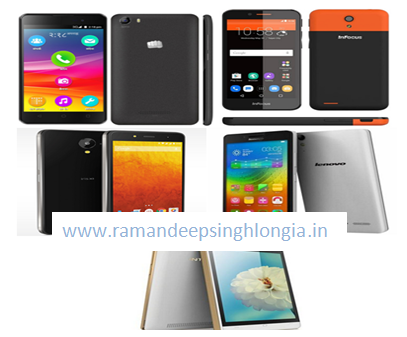
    Today I am going to tell you best smart phones in Indian market currently available. We all know that in India most people buy inexpensive phones which will just do their work.  So here I would like to mention top 5 phones which you will get under just Rupees 6000 and let me tell you that all these phones in my list are the best among all under this price segment and they have some killer features so many that you won’t even believe that phones can have these many features for such a cheap price. So do take a look below and here is my list of top 5 phones under 6000.

    1. Canvas spark 2 (Android Smart Phones Under 6000 Rs) – it is a very good phone and let me tell you that Micromax is a very good brand and it has launched a killer phone in this price segment. Canvas spark 2 has 1.3 GHz processor quad-core processor. Let me tell you that the phone is really fast and speed is very good. It has 5 inch display and has 5 megapixel of camera and if you talk about the front Camera than let me tell you that Canvas spark 2 has 2 megapixel of camera.  It has 4GB internal storage which is expandable to 32GB and has 1GB of Ram.

    2. Infocus M260 (Android Smart Phones Under 6000 Rs) – Infocus M260 is a mid range phone and this phone is very good I must say that. – Infocus M260 phone is packed with several features and it has a 4.5 inch of screen and has 3GHz quad-core processor. The phone has MediaTek processor and it has 5 megapixel of rear camera and 2 megapixel of front camera. The phone has 8 GB of internal storage and 1 GB of Ram and the storage can be expanded up to 32 GB. It is powered with 2000 maH of battery. So it is a good phone in this range.

    3. Lava Iris X1 Selfie (Android Smart Phones Under 6000 Rs) – it is also one of the phone in low mid range and let me tell you that this phone is a very nice phone and as the name suggests this phone has very good features. The phone is powered by Quad Core, 1.3 GHz processor along with it; Lava Iris X1 Selfie has 8 MP Primary rear camera and 5 mega pixel front camera. It also has 2000 mAh battery which will give you good battery backup. So if you ask my view than I would say that Lava Iris X1 Selfie is a damn good phone and good phone in this price segment.

    4. Lenovo A6000 (Android Smart Phones Under 6000 Rs) – it is also a very good phone and we all know that Lenovo phones are giving high competition. Lenovo A6000 has one GB ram and screen size of 5.0 inches. Lenovo A6000 also has 8 megapixel of rear camera and 2 megapixel of front camera. Lenovo A6000 is powered by 2300 mAh battery. So in the end I would like to say that Lenovo A6000 is a very good phone and you must not think twice before buying it.

    5. Intex Cloud Zest (Android Smart Phones Under 6000 Rs) – it is a very good phone launched by Intex and let me tell you that the phone has 5 inch display and the phone has 5 megapixel of rear camera and 2 megapixel of front facing camera and it has 1.1 GHz of processor and 1 GB Ram. So I would like to say that this is also a very good phone if you are considering buying phone in this segment.

  • Top 5 Best Android Smart Phones Under Rs 8000

    Top 5 Best Android Smart Phones Under Rs 8000

    Top 5 Best Android Smart Phones Under Rs 8000 IndiaTop 5 Best Android Smart Phones Under Rs 8000 India

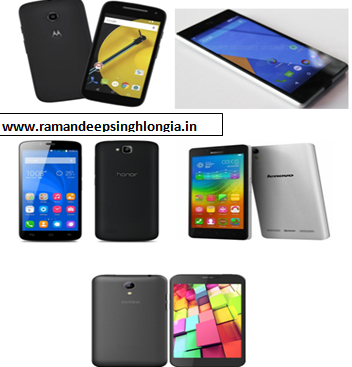
    We all know that in India most mobile phone users buy mid range phones and more than 50 % of India’s population consists of middle class people.  So most people buy budget phone. So I would like to give top 5 phones that you can buy under Rupees 8000.

    1. Moto E 2nd gen (Android Smart Phones Under 8000) – in my view it is a best phone under 8000 rupees as it is value for me. And trust me you won’t get any better phone than Moto E 2nd gen. here I would like to tell you some of the specifications of the phone. The moto E second gen phone has 1GB of Ram and it has 8 GB of internal storage which is simply phenomenal in this price tag. You will find 5 megapixel front camera and 0.3 megapixel back camera in Moto E 2nd gen. it is very sleek if you talk about the design of the phone than also it has curved edges which helps in better grip. Moto E 2nd gen has Snapdragon 200 processor which is clocked at 1.2 GHz Quad core. The memory is expandable up to 32 GB. So Moto E 2nd gen is a good phone in this price segment.

    2. Micromax Yu Yuphoria (Android Smart Phones Under 8000) – Micromax launched this phone last year and Micromax Yu Yuphoria is among the best mid range phone you can ever grab. If you want to buy Micromax Yu Yuphoria than let me give you information that it is only available online. Micromax Yu Yuphoria phone is packed with many good features and it also has 8 megapixel rear camera and 5 megapixel front camera. Micromax Yu Yuphoria runs on Android Lollipop 5.0 versions and it has 32 GB on internal storage and 2 GB ram which is really good in this price segment and the phone runs without any lag. If you talk about the processor than let me tell you that Micromax Yu Yuphoria has 64 Bit Snapdragon 410 processor and which gives it an edge over other contemporaries. Micromax Yu Yuphoria comes with a huge 5 inch display. So in the end I would like to say that it is one of the best phone in this price segment

    3. Huawei’s Honor Holly (Android Smart Phones Under 8000) – Huawei’s Honor Holly comes with 16GB internal storage which is simply phenomenal in this price segment. It comes with 8 megapixel front camera and 2 megapixel back camera. It has 1.3 GHz Mediatek processor which is very useful in running high end games like Nova 3 and Asphalt 8. It has 2000 maH battery which is pretty good but won’t do the job if you are heavy user like me. One downside of Huawei’s Honor Holly is that it does not have 4g or LTE connectivity.

    4. Lenovo A6000 (Android Smart Phones Under 8000) – it is also one of the very good phone which is coming from Lenovo Company. One thing here I have seen and which is Lenovo now-a-days launching many phones and the phones of Lenovo company doing well. Lenovo A6000 comes with 2GB of Ram and you will have an internal storage of 16GB. Lenovo A6000 mobile phone comes with 8 Megapixel of rear camera and 2 megapixel of front camera. It is a 4G phone and has Snapdragon Quad core processor. So my verdict is do go and buy Lenovo A6000 as its great value Smartphone.

    5. Intex Cloud 4G (Android Smart Phones Under 8000) – this is one more phone which is considered best in this price segment. Intex is slowly growing in phone markets and let me tell you that Intex Cloud 4G is a real hit in the market and people are going crazy over this phone. It comes with 13 megapixel and 5 megapixel front camera. Intex Cloud 4G phone has Mediatek 6735 – Quad-Core processor and it has 2300 mAH battery. It has 16 GB of internal storage and has 2GB of Ram.

  • Freedom 251 Price, Features, Specifications Android Phone

    Freedom 251 Price, Features, Specifications Android Phone

    Freedom 251 Price, Features, Specifications Android PhoneFreedom 251 Price, Features, Specifications Android Phone

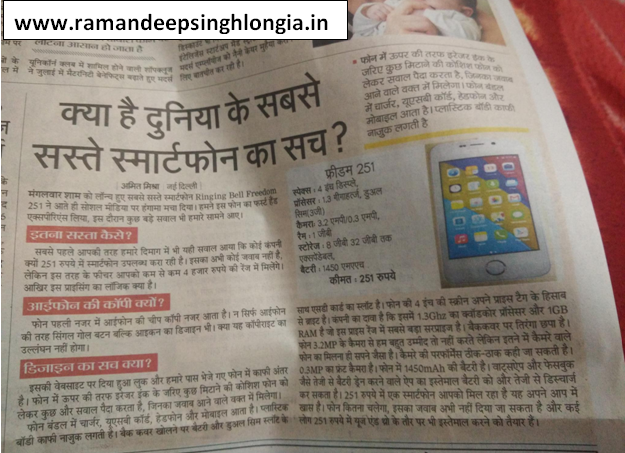
    Freedom 251 is a new phone which is launched by Indian government and the Freedom 251 phone has been launched under make in India scheme. Freedom 251 phone has been launched as Indian government is trying hard to make India Digital and let me tell you that the phone is pretty impressive. Freedom 251 phone is termed as world’s cheapest phone and let me tell you that Freedom 251 phone is priced at just rupees 251. If you talk about the configuration than let me tell you that Freedom 251 mobile gave 1 GB of ram and the phones supports 8 GB of memory. Freedom 251 phone has 4 inch display and I must say that the phone is fabulous. Freedom 251 has 3.2 megapixel rear camera and which is simply breathtaking in this price tag. More shocking thing is that the phones also possess 0.3 megapixel camera and the phone has 1450 mah battery. Freedom 251 has expandable memory of 32GB and I must say that the phone is tremendous and I must appreciate the efforts of Indian government. Freedom 251 phone is launched to make India digital and let me tell you that the phone is simply superb and I would say that this deal is a once in a lifetime deal and I will say that do not miss this deal at otherwise you will regret. Freedom 251 phone can be booked via Freedom 251 website. So what you are waiting for? Do go and book you phone.

    Freedom 251 Full Phone Specification & Price Details & Booking Site:

    Android: 5.1 Lolipop

    Battery: 1450 mAh

    Screen Size: 4 Inch

    Processor:  1.3 Ghz Qad Core

    Price: 251 Rs.

    Website To Book Freedom 251: www.freedom251.com

    How To Book Freedom 251 Phone

    1. Goto www.freedom251.com
    2. Select Quantity and Fill Particulars
    3. Now Select the Payment Method For Booking Freedom 251 E.g. Debit Card, Credit Card & Net Banking etc.

    Freedom 251 Price, Features and specifications – Ringing Bell Launched World’s Cheapest Smartphone

  • Best Top 5 Tips To Increase The Battery Life Of  Your Phone

    Best Top 5 Tips To Increase The Battery Life Of Your Phone

    Best Top 5 Tips To Increase The Battery Life Of  Your Phone

    We all know how much useful our phones are for us. In modern world and specially in today’s generation we do all our work with phones and we know that phones have made our lives easy and now-a-days it is very difficult to even spend a day without phone  and trust me phones have become so much the part of our lives that you feel that your phone is part of your family only and in other words if I want to describe this than I would say that we all are addicted to phones and we all know that if you calculate the total share of phones we know that android phones are more than anyone else. Now the main thing and which is batter backup as we all know that with heavy use phone battery doesn’t last much longer. And we all know that how it feels when our phone battery drains out. So here in this article I would tell you different ways to increase the performance of the battery of your phone and let me tell you that these tricks and ways will help you to increase the batter back up of your phone.

    Top 5 Tips To Increase The Battery Life Of Your Phone

    1. Turn Off Bluetooth And WiFi After Usage – this is the most important and very common method from which you can increase the battery backup of your phone. as well all know that when we use Bluetooth or WiFi the battery of our android phone takes lot of load. So if you want to conserve the battery of your phone than you must turn of the WiFi and Bluetooth of your phone.

    2. Turn Off Internet after Use – we all know that how much battery our internet consumes and turning off internet will help you in a very great way and especially 3G internets drains your battery very fast. So if you want to make your phone last longer than I must say that you should turn your internet on when you need to otherwise you should keep your internet off.

    3.  Turn On Power Saver Mode – this is the most common feature and this feature will help you when you are less on battery. You can say that this feature is a last option when you want your battery to last a good day but you are not able to charge your phone than the best and most safe option is that to turn the power saver mode of your phone on.

    4. Check The Apps Which Is Using More Power – well this is the first thing you should do as let me tell you that turning off background apps can save your battery and what the need of excess background apps? So the first thing you should do is to turn off all the unnecessary background apps which are draining your power and your phone will last few hours long for sure.

    5.  Decrease Display Brightness Or Set To Auto – as we all know that phone display also consumes a lot of battery so in order to avoid it you should set the setting of you display light or brightness to Auto so that light will be automatically adjusted according to the situation and you should not set your phone on high brightness as it will consume more power. So set the auto brightness option.

  • Top 5 Best Mobile Tracking Android Apps For Lost Android Device

    Top 5 Best Mobile Tracking Android Apps For Lost Android Device

    Top 5 Best Tracking Apps For Lost Android Device

    We all know that how much important our phone is to us. We know that in today’s world and in today’s time how much value we give to our phones and how much work we do on them. Well in other language I could say that our phone acts as a mini laptop or computer to us and not only it gives us the medium of communication but also our phone gives us various other important information as well.  And we know that android users have maximum number of shares if you calculate it keeping the total mobile phone users in view. We also protect our phone data and privacy by using various methods such as pattern lock or pin password or various other things. But what if our phone which is so valuable to us what if it gets lost?

    So in this article I would tell you about various androids apps and by taking help of these apps you can get back your phone as you can track your phone and after tracking you can get to that person with ease as these apps will help you to locate the correct location of your devise. So the lists of apps are as follows:

    1. Where’s My Droid – this is very good software which helps in the tracking of your phone. It is a best android app to track your lost phone and let me tell you that this app won’t disappoint you for sure. this app will work even without internet connection as when you don’t have internet connection than also you can you can trace your mobile as you can send message to your number from your different phone and so that your phone will be tracked by SMS also without the help of internet also.

    Where’s My Droid Android App

    2. Anti Droid Theft this is the 2nd best android app which can be very useful in detecting your phone location and trusts me that this app won’t disappoint you for sure. These apps just like other one provide you with lot of security and not only security but it also provides you with the perfect location of the device and by getting that you can than track the culprit.

    Anti Droid Theft Tracking Andoid App

    3 . Seek Droid – it is another android apps which can detect your lost android phone. The main thing about this app that makes it different from other apps is that the user interface of his app is very good and the user interface of this app is very easy also and very simple and people can use this app very easily and even the beginners can also use this app with ease.

    Seek Droid Android App

    4. Android Device Manager this one is considered as the most fast phone lock tracking app and it can track your songs in seconds. It has the ability to changing your screen lock and it has ability to change your pins and passwords directly. When your phone gets lost it gets activated automatically and let me tell you that this app is very useful and I must recommend you that do install this app.

    Android Device Manager App

     5. Prey Anti-theft this is may be the last in the best but trust me this app has some qualities that other apps don’t have and let me tell you that it is one of the widest used app in the android platform and let me tell you that most people use and prefer this app. So I would like to suggest that do try this app definitely and I am sure that you will like the app for sure and check it out.

    Prey Anti-theft

  • Top 5 Hacking Android Apps – 2016

    Top 5 Hacking Android Apps – 2016

    Top 5 Hacking Android Apps – 2016

    We all know that in today’s age technology is so important and we also know that we have to keep pace with the world. There are many things which are famous in today’s youths and among those things one thing that attracts all youth is hacking. In today’s world hacking is not that mysterious world as it used to be. Now there are various apps also which you can say are not proper hacking tool but they help you in some way like if you want to enter a secured wifi network than they will help you in a great way. There are various android apps available now-a-days and as I told earlier these are not proper hacking apps but they can be useful in ethical hacking purposes. And one thing I must tell you is that these kinds of apps will definitely enthrall the tech aficionados. These apps are for the users who really want to explore the tech world. There are many tricky apps in the store and we also know that android platform has maximum number of apps in its market. So I would like to list best 5 android apps for ethical hacking purpose which you can use.

    1. Kill Wifi – it is a very good and most popular app which is used now a day and let me tell you that it is the most downloaded hacking app which is currently available on android platform. This app gets more than thousands of download per day and Kill WIFI app is sitting at the top with this much downloads. Basically this app can cut the wifi of other people and let me tell you that it is a very amazing app.

    Kill WIFI

    2. Hackode: Hackode is an app which is very famous and popular. Hackode app is basically for ethical hacking and this app is used by IT professionals and many other people use this app. It has many users and people do like this app. As I told you earlier this app is for professionals. This app can do scanning and all. It can also perform many other functions.

    Hackode

    3. nMapper – nMapper is another hacking app which is on the android platform but there is one thing that differentiate nMapper app from other apps and which is nMapper app is a paid app. This app provides you with the pictorial view of network and which is very helpful indeed. Structure it means that while other apps are available for free on android platform but to use and download nMapper app you have to pay first, you have to pay a certain amount and then only you can download the nMapper app.

    nMapper

    4. Network Spoofer – Network Spoofer is another app which is available on android platform.  This app can do wonders and you won’t believe it until you will install it. Network Spoofer can do amazing things as this app can change other person’s website also and not only this but this app can get access to others wifi passwords and secured connection also.

    Network Spoofer

    5. Network Discovery– this is another best android app for hacking and main thing about this app is that this app is available for free on Google plat store and one more thing which makes this app different from all other apps in its leagues is that if you want to use this app you can do that without rooting your phone and you can use it on your uprooted phone.

    Network Discovery