Category: Articles

  • How To Download Whatsapp Without Mobile Number?

    How To Download Whatsapp Without Mobile Number?

    How To Download Whatsapp Without Mobile Number

    How to download Whatsapp Without Mobile Number?

    Whatsapp is a social networking site. It is an app through we can interchange messages with our friends in a very easy manner through net connectivity. Not even messages we can ex – change multimedia, songs, videos. The most unique part of this app is that we can send our voice through audio recording and we can get it also from our friends. This app is very easy and most convenient to use. The best part of this is it does not sell ads. Whatsapp is a very common app in all age groups. Not even in mediocre people a small kid also knows how to use it and our elder citizens also love to use it. We can make groups on it and can send a message one message to all our friends who are there in group.

     As we use Whatsapp in our smart phones. It is a personal device but anyone can get it and hack it very easily. Even sometimes they can format data of your phone. And after that they can erase it. But you can get your data very easily. But from all such kind of thinks one thing is very different and safe to you is to use Whatsapp without using your mobile number. So here are the following steps regarding How to use Whatsapp without mobile number:

    Steps how to use Whatsapp without using mobile number:

    1. At first, you have to download Whatsapp in your smart phone, PC and Tablet if you won’t have it.

    2. Then Install and launch it.

    3. If you are old Whatsapp user check it that you have not verified it. If you have verified it then you have to delete your account and install it again.

    4. Then you have to download a messaging app Text now in your phone. This messaging app will give you a number that you can enter in Whatsapp and verify your account.

    5. Now open the app Text Now and compete the setup process. Once it is done Note down the number.

    6. Once you have written the number just go to Whatsapp and write the number where so ever you have to do in your phone, PC, Tablet.

    7. Then, agree with the terms and conditions applied on it. Then enter your number and the country where you live.

    8. Wait for few minutes for SMS verification. As if one it fails. Click on the call option to get a call from Whatsapp.

    9. Then open your app Text Now the call will be coming. Pick it up and listen the verification code it speak numerous times and write it somewhere.

    10. Then enter the six digit verification code on Whatsapp.

    11. After entering it the process will be complete and you can start up your Whatsapp without using your mobile number or sim card.

  • Best Top 6 Password Manager Android Apps

    Best Top 6 Password Manager Android Apps

    Best Top 6 Password Manager Android Apps

    In today’s scenario, when it comes to smart phone safety, the single most important thing any person can do in their phone is the lock device with unique and different pins. As today we have an android phone with us in which we have all secrets in it like photos, messages, data, and many others. So to hide them from other we need a secured app to help us out.

    Let’s check out favorite password manager for android below:

    1. App Lock – It is the most popular app of android for safety. By app lock you can hide your pictures, contacts, gallery, messenger, SMS, Gmail and any app which you want to hide. It is very simple and convenient to use. The password can be your pattern, pin and name. It takes less storage. It has high range of users which are using it.

    App Lock

    2. Keeper – This is the world’s best and most relevant popular app. It is in high range downloaded password manager app. Millions of uses use it to save and protect their data and private information, preventing against hackers and data theft from others. The online support of this app is excellent if you have any problem. Unlimited and sync is free during trial period. It is compatible with android and ios.

    Keeper

    3. aWallet – It is also the best app for password manager. It securely stores your passwords, credit cards information, e-banking credentials, web accounts and other custom data. This app supports backup and restore of your encrypted data. It does not show any kind of advertisement in it. The best part is that it can unlock with fingerprint. If you ever forgot you password it will easy to find on this app. It takes less storage.

    aWallet

    4. Dahlane – It is also a very popular power manager app. It is having very solid and best password security system and it makes simple login to apps and websites. This feature is unique than others including auto – login on websites and apps. In this app you can keep all your passwords at one safe place. Yu can log in to apps and websites just simply in 1 second. All around it is a great app.

    Dahlane

    5. mSecure – This app is user friendly password manager app. So it is famous app. It uses ultra-secure 256-bit encryption to protect personal information such as account numbers, usernames, and passwords. This app is having it security feature very unique. It is having auto backup to SD card and Email backup. It is a great app that does everything you need. Generates passwords, or create your own. Stores passwords, links, and bank, credit card information if you want. Also easy to Sync & back-up to computer for easy transfer from one phone to another. Keeps everything organized. Great app-highly recommend!

    mSecure

    6. RoboForm – This app is very famous in desktop version but he same for it is in android. The unique features of RoboForm include integration for Dolphin and Firefox browsers. The background of the app does not look good but it is very awesome and it gives what you want. It automatically login to web accounts and very easy and convenient to use. You can rely on it for securing your personal data and information.

    RoboForm

    Try these 4 trusted apps! For securing your data.

  • 12 Hidden YouTube Secrets – That You Must See

    12 Hidden YouTube Secrets – That You Must See

    12 Hidden YouTube Secrets - That You Must Watch

    12 Hidden YouTube Secrets – That You Must See

    Here, we are going to tell you 12 hidden you tube secrets. These all are present in YouTube search pages or hidden pages. When you will search you will notice something different on the screen. These hidden you tube secrets which are there on YouTube to provide some fun to the users. So, let’s get to know some of them:

    1. Open the YouTube in that we have keyboard shortcuts if you will press these letters what will happen on the video:

    a. K will stop your video.

    b. J will rewind your video by about 10 second’s interval.

    c. L wills faster your video after 10 seconds.

    d. M will mute your audio. If you don’t want to hear anyone you can press it.

    e. N will move to the next video in the queue line.

    f. Shift + P you can go the previous video.

    2. Now if you are typing on YouTube Use the Force Luke it will make your screen shift side by side, up and down. The videos will be shown with using The Stars Wars Effect. You will get to notice a wavy effect on the screen.

    3. On the YouTube screen if you type do the Harlem shake, The YouTube will hormone shake and the screen will also shake it will be of a little fun.

    4. Now type doge meme into the search bar and you will see multi colors. Such color will look very beautiful. This is a very lovable and good feature of hidden secrets of YouTube.

    5. Sometimes you will not feel to use your mouse; you get rid, lazy or bore from it. Type in youtube.com/lean back and now you can navigate and use it only using the keyboard with the onscreen button comments.

    6. Now you can type Geek week on YouTube and you will get a geekiest layout.

    7. If you type an ssyoutube.com/video by this you can download your favorite videos and show it to others. Or you can put it on your USB and TV.

    8. Now you type and search Web driver Torso in search box. The page will show you a red background and it will show you a blue rectangle around some videos.

    9. Open the screen and type youtube.com/test tube this will allow you to test the coming YouTube features. Whenever a new thing will come you will get to know this is a much updated hidden secrets of YouTube.

    10. Now type mooma.sh you can copy and paste. You can rectify any songs in the video that you love. If you love nay songs from the video you can copy that. This is a very interesting feature of hidden YouTube secrets.

    11. Open the YouTube now type beams me up Scotty. The results on the screen will be shown in the classic form. It will set phrases and this will be a great fun.

    12. Open the YouTube just type 1980 while watching the video. You don’t have to type it in search box just type it like this and see above the video it will open your Missile game. This is a great fun. It is a nice hidden secret of YouTube.

    These all are the best 12 Hidden secrets of YouTube. Check it out and have great fun!

  • Top 15 Best Ad Networks for Publishers

    Top 15 Best Ad Networks for Publishers

     Top 15 Best Ad Networks for Publishers

    Top 15 Best Ad Networks for Publishers

    An advertising network for publishers is a company which connects the advertisers to the company who wants to give ads. The advertising network is different because it directly catches the attention of the people and its main important of this is ad network is aggregation of ad supply from publishers and matching it with a public or advertiser demand. So here we are going to tell you some best Ad Networks for Publishers.

    1. Google Adsense – As it is joined with Google though you can think it does not need and popularity. As it is the world’s largest company for Ad Networks. Thus it shows best display ad, mobile ads, video ads and search result ads. No Publisher Traffic Requirement needed. So this is the most prominent and easy for users.

    2 . Revenue Hits – It is a best site for Ad Networks for publishers. They offer to provide a self-service work for Advertisers, where anyone of them can come and buy quality traffic. It serves over two billion ads each day. It provides different kinds of properties such as websites, mobile sites, add-ons, widgets, toolbar, and many more.

    3. Infolinks – It is best site for Ad networking and it is most popular among the citizens. This is a global advertising platform for every user. If the client is having rich site or a blog then Infolinks will be the best for the users.

    4. Adsterra Network – This network is one of the most young and fastest growing premium ad networks and very good for the publishers. It has over billion ads in a month. This will be the most profitable and best Ad networking sites for publishers.

    5. Propellerads – It has been working since long as the year 2011. They provide and have good and less rates services from the other site networks. So it will be beneficial for the new comers. It will be the best partner for publishers and advertisers for Ad Networks

    6. Media.net – It is the new technology leading company that has developed new and different innovative advertising products for publishers and its advertisers. It has its number of employees in it. The best part is that it sells ads from the Yahoo! Bing. It will be the best As Networks for Publishers.

    7. Advertising.com – As by name it can reflect what it is. But it is the advertising company based in the United States. It combines the industry of most advanced work and technology and target network to deliver its publishers and advertisers. But they will only approve the sites on having huge visitors. It is the best Ad network site for publishers.

    8. Tribal Fusion – This is the best and different one. As something’s is there on which its popularity depends. On working in Tribal Fusion is too much easy for users. It keeps different kind of mutual understanding with its advertisers and publishers. It is just quick and flexible. Best Ad network for publishers.

    9. BuySellAds – This will be best for the users who have just begun their works. It does require traffic requirements. In this the ads are present in small size. They are compatible. So this site will be best for the new comers and fresh users for Ad Networks.

    10. Conversant media – This is having a different kind of publishers who are industry leaders. Conversant is increasing and —benefiting ad tech to the next level by making it digital display, mobile and video ads more personal, relevant and valuable to individuals, across all their devices anywhere, every day. This will be more appropriate to the industrial domain users for Ad Network.

    11. CPX Interactive – It is the top most advertising site for publishers and advertisers. You can trust on this network and it is very beneficial. It is a progressive online ad network and global marketing company. It has More than 20,000 optimized creative’s. But in this the condition is that the publisher site should must have minimum 30,000 Visitor per month. So this is the best Ad network for publishers for best earning plan.

    12. Criteo – It is a very good network and a quickly gained traction and now it has become a top earner for website owners everywhere. This is very unique. Now it is working with 30 markets all over the world. It is form of display advertising. This Ad network for publishers is very appropriate to establish in world.

    13. Vibrant Media – This is an ad network the best part is that they offers such a specialty ad formats such as in-text, in-image, light box, storyboard and many more etc which will help them to learn huge amount. But the condition will be that the site should must have 500,000 page impressions per month.

    14. Chitika – This is also one of the best networks. It has huge number of publishers and serves over billion of publishers. It is the largest advertising network. It does not require Publisher Traffic. It is he good and best Ad Network for publishers.

    15. Adcash – It is also one of the best advertising networks. The ads on this based are CPM, CPL, CPA, CPC. No publisher traffic requirement. It supports all industry and it has very different formats from other networks. So it is best network for Ad network for publishers.

    So, these are the best Ad networks for publishers.
  • YouTube SnoopaVision – Watch Each & Every Video In 3D

    YouTube SnoopaVision

    What Is YouTube SnoopaVision?

    As YouTube is a site by which everyone can see the video. Now days it is a most popular site for sharing or watching anything. Basically, it is a free video sharing website in which everyone can share their videos also and you can see all the videos online. It can be a song a dance or a serial, movie trailer and many more things.

    YouTube has million numbers of videos. It just uploads videos in every minute. YouTube SnoopaVision is popular because it has every kind of videos whatever you want. Now YouTube is very excited to tell you that we have discovered and have innovated a new feature that is you can watch every video in 360 spherical. People were asking for this since so long so they have launched this new product. YouTube Snoop Vision  So this is a very new product that you can see video in 360 through SnoopVision as technology is going wider. In order to upload a 360 degree video file, you’ll need to modify the file with an app or script before uploading. YouTube Snoop Vision will be going to an immersive experience. Now the viewers can see the thing which was impossible earlier like the stage and the crowd of the concert which you want to see, the sky and the ground as you wing suit glide, or you could even have a choose-your-own-adventure video where people see a different story depending on where they look. You know how this will get possible only because of 360 degree video uploads. The best part is that you can watch these videos in your phone and tablets also. YouTube has downloaded it so that creators can give their viewers a unique video experience. YouTube now supports 360-degree videos (YouTube SnoopaVision). While the selection of currently available videos is limited, the technology is exciting nevertheless. Look for the number of these videos to explode as 360-degree. It is new way to share and see your world. Now you can watch all your videos on the existing YouTube app for Android, and by moving the phone or tablet around they’ll see all the different angles while the video plays. So this new invansion of YouTube SnoopaVision is speechless and unpredictable.

  • Best Top 5 Free Video Converter Software For Windows

    Best Top 5 Free Video Converter Software For Windows

    Best Top 5 Free Video Converter Software For Windows

    In today’s hectic life we deal with many issues which baffle us. Getting stuck with our important videos is one of those. We record videos, share videos, store videos. Many times we record with our phones. Sometimes we prefer to use our camera and other such devices. After recording, we consider them to store. We try to shift all of them to one place. Oops! ‘Format is not supported?’ We usually face this problem and to solve this problem we need to change our videos to a compatible format which can be read by all the devices whether our mobile phones, windows, Linux or Mac. In order to change the format of our essential videos we require a good video converter. Today, here I’ll be giving you suggestions about video converters which you may use to convert your video stuffs. List as follows:

     1. HANDBRAKE – We stumble upon many but give this tool the first place. This software works very smooth and not only it does the job of video converting but it has many other features and functions as well. Handbrake can perform converting and transcoding. It is free and has potential to work cross platform. HANDBRAKE is also a DVD ripping tool. Which gives it reason to be rated high.

    HANDBRAKE

     2. Freemake Video Converter – Another we have here is a completely free tool which can convert videos for you in many different formats. It has more than 200 possible converting format options. Freemake video converter has a clean and nice interface which allows us to easily convert videos. This software is highly customizable according to your needs. It comes with many other things to perform as well, which might be useful for you. It supports windows platform.

    Free Make Video Converter

     3. MPEG Streamclip – A fast and flexible video converter for windows. MPEG Streamclip has unique set of options. It has a video player also but for converting purpose. MPEG Streamclip allows you to do more than just converting; it can copy, paste and trim your videos. It is swift in its job and is popular among the users.

    MPEG Streamclip

    4. Format Factory – As the name suggests it is highly abandoned in formats. Format Factory gives you complete freedom to convert your videos and  It primarily  supports the MPG, MP4, MP3, AVI, 3GP, OGG, BMP, TIF, TGA, ICO, WMA, SWF, FLV, JPG, WMV and a lot more format options. Format Factory has an option to reduce the file size also. It is the richest tool in this category.

    Format Factory

    5. SUPER  – Lastly in the category we have an underrated tool to convert your videos. It probably doesn’t have the clean interface but it performs very well as far as the trans-coding of the videos is concerned. SUPER is free entirely and has a number of advanced setting which gives you grip on your videos. It has some powerful and effective options which make it stand apart in the category. SUPER has everything or perhaps more than that you’ll ever need.

    Next time you ever are struggling with your videos to convert them. Do consider upon the soft wares motioned in the above.

  • Top 5 Best Free Mobile Recharge Apps For Android Devices

    Top 5 Best Free Mobile Recharge Apps For Android Devices

    Top 5 Best Free Mobile Recharge Apps For Android Devices

    Are mobile phones billing high? Do you want them to get reduced and pocket friendly? Why don’t you try FREE mobile RECHARGE apps? We live in a world today which is incomplete without mobile phones and money. And for some people, mobile phones bills burn pockets. Today, I’ll suggest you some really good and proved mobile apps which can cut your high phone bills in an easy manner with no complicated things in a lesser time than you have expected. To top up your mobile for free, take a look at these proved apps and try these:


    1. mCent – mCent is an another known app to earn money for free. Through this widely popular app you can earn up to 50 INR. To earn money from this app is a simple process. Just you need to install this app and register with your number on the app. next what you need to do is to try the other apps suggested on mCent by installing them. And the apps will provide you with free airtime balance.  Isn’t it simple?

    mCent

    2. Earn Talktime – Next we have in the list is Earn talk time app which gives you free earning for your mobile phone. This app is being installed by more than 1.5 lakh people across the globe. It gives you free recharge of amount up to 100 INR. You also can redeem you earned money on flipkart and other various shopping portals. It works on different platforms.

    EARN TALKTIME

    3. Mobitalktime – It’s a great app to get free recharge coupons. It gives its users many ways to earn money by easy doings. It supports different mobile operators like Vodafone, Airtel, Reliance, Tata Docomo, Aircel, Idea, BSNL, MTS etc. It has many numbers of users and you can rely on it to earn free recharges. It gives bonus of 25 INR per referral. It has users on various platforms like Android and ios.

    MOBITALKTIME4. Task bucks – This is a different app in the league to earn free talk time. It has a unique program by which you can earn money. It is a genuine app and is recommended for free recharge. This app gives you money and you can earn by simply by referring it to different people. It also gives you 3G data. Per referral it gives 25 – 40 INR.

    Task bucks


    5. Ladoo – First in the list we have LADOO app. This app is recommended and is best app for free recharge. It has over 11 lakh users widespread. By this app you can earn money in a number of ways like completing task, playing contests, taking parts in polls and surveys etc. LADOO also allows users to transfer their earned credits to wallets. It is available on android, ios and PCs as well.

    Top 5 Best Free Mobile Recharge Apps For Android Devices

    Try these tested apps and earn money for free in a hassle free manner.

  • Best 5 Android Smartphones Under 6000 Rs – 2016

    Best 5 Android Smartphones Under 6000 Rs – 2016

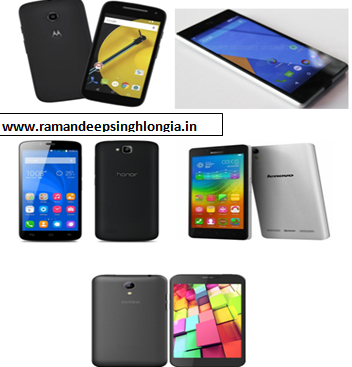
    Top 5 Best Android Smart Phones Under Rs 8000Best 5 Android Smartphones Under 6000 Rs – 2016

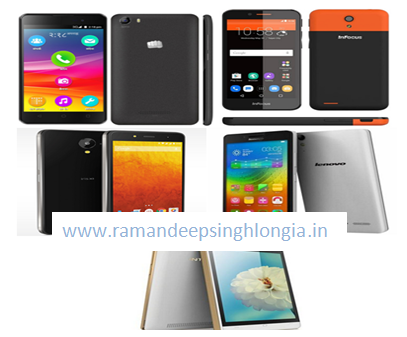
    Today I am going to tell you best smart phones in Indian market currently available. We all know that in India most people buy inexpensive phones which will just do their work.  So here I would like to mention top 5 phones which you will get under just Rupees 6000 and let me tell you that all these phones in my list are the best among all under this price segment and they have some killer features so many that you won’t even believe that phones can have these many features for such a cheap price. So do take a look below and here is my list of top 5 phones under 6000.

    1. Canvas spark 2 (Android Smart Phones Under 6000 Rs) – it is a very good phone and let me tell you that Micromax is a very good brand and it has launched a killer phone in this price segment. Canvas spark 2 has 1.3 GHz processor quad-core processor. Let me tell you that the phone is really fast and speed is very good. It has 5 inch display and has 5 megapixel of camera and if you talk about the front Camera than let me tell you that Canvas spark 2 has 2 megapixel of camera.  It has 4GB internal storage which is expandable to 32GB and has 1GB of Ram.

    2. Infocus M260 (Android Smart Phones Under 6000 Rs) – Infocus M260 is a mid range phone and this phone is very good I must say that. – Infocus M260 phone is packed with several features and it has a 4.5 inch of screen and has 3GHz quad-core processor. The phone has MediaTek processor and it has 5 megapixel of rear camera and 2 megapixel of front camera. The phone has 8 GB of internal storage and 1 GB of Ram and the storage can be expanded up to 32 GB. It is powered with 2000 maH of battery. So it is a good phone in this range.

    3. Lava Iris X1 Selfie (Android Smart Phones Under 6000 Rs) – it is also one of the phone in low mid range and let me tell you that this phone is a very nice phone and as the name suggests this phone has very good features. The phone is powered by Quad Core, 1.3 GHz processor along with it; Lava Iris X1 Selfie has 8 MP Primary rear camera and 5 mega pixel front camera. It also has 2000 mAh battery which will give you good battery backup. So if you ask my view than I would say that Lava Iris X1 Selfie is a damn good phone and good phone in this price segment.

    4. Lenovo A6000 (Android Smart Phones Under 6000 Rs) – it is also a very good phone and we all know that Lenovo phones are giving high competition. Lenovo A6000 has one GB ram and screen size of 5.0 inches. Lenovo A6000 also has 8 megapixel of rear camera and 2 megapixel of front camera. Lenovo A6000 is powered by 2300 mAh battery. So in the end I would like to say that Lenovo A6000 is a very good phone and you must not think twice before buying it.

    5. Intex Cloud Zest (Android Smart Phones Under 6000 Rs) – it is a very good phone launched by Intex and let me tell you that the phone has 5 inch display and the phone has 5 megapixel of rear camera and 2 megapixel of front facing camera and it has 1.1 GHz of processor and 1 GB Ram. So I would like to say that this is also a very good phone if you are considering buying phone in this segment.

  • Top 5 Best Android Smart Phones Under Rs 8000

    Top 5 Best Android Smart Phones Under Rs 8000

    Top 5 Best Android Smart Phones Under Rs 8000 IndiaTop 5 Best Android Smart Phones Under Rs 8000 India

    We all know that in India most mobile phone users buy mid range phones and more than 50 % of India’s population consists of middle class people.  So most people buy budget phone. So I would like to give top 5 phones that you can buy under Rupees 8000.

    1. Moto E 2nd gen (Android Smart Phones Under 8000) – in my view it is a best phone under 8000 rupees as it is value for me. And trust me you won’t get any better phone than Moto E 2nd gen. here I would like to tell you some of the specifications of the phone. The moto E second gen phone has 1GB of Ram and it has 8 GB of internal storage which is simply phenomenal in this price tag. You will find 5 megapixel front camera and 0.3 megapixel back camera in Moto E 2nd gen. it is very sleek if you talk about the design of the phone than also it has curved edges which helps in better grip. Moto E 2nd gen has Snapdragon 200 processor which is clocked at 1.2 GHz Quad core. The memory is expandable up to 32 GB. So Moto E 2nd gen is a good phone in this price segment.

    2. Micromax Yu Yuphoria (Android Smart Phones Under 8000) – Micromax launched this phone last year and Micromax Yu Yuphoria is among the best mid range phone you can ever grab. If you want to buy Micromax Yu Yuphoria than let me give you information that it is only available online. Micromax Yu Yuphoria phone is packed with many good features and it also has 8 megapixel rear camera and 5 megapixel front camera. Micromax Yu Yuphoria runs on Android Lollipop 5.0 versions and it has 32 GB on internal storage and 2 GB ram which is really good in this price segment and the phone runs without any lag. If you talk about the processor than let me tell you that Micromax Yu Yuphoria has 64 Bit Snapdragon 410 processor and which gives it an edge over other contemporaries. Micromax Yu Yuphoria comes with a huge 5 inch display. So in the end I would like to say that it is one of the best phone in this price segment

    3. Huawei’s Honor Holly (Android Smart Phones Under 8000) – Huawei’s Honor Holly comes with 16GB internal storage which is simply phenomenal in this price segment. It comes with 8 megapixel front camera and 2 megapixel back camera. It has 1.3 GHz Mediatek processor which is very useful in running high end games like Nova 3 and Asphalt 8. It has 2000 maH battery which is pretty good but won’t do the job if you are heavy user like me. One downside of Huawei’s Honor Holly is that it does not have 4g or LTE connectivity.

    4. Lenovo A6000 (Android Smart Phones Under 8000) – it is also one of the very good phone which is coming from Lenovo Company. One thing here I have seen and which is Lenovo now-a-days launching many phones and the phones of Lenovo company doing well. Lenovo A6000 comes with 2GB of Ram and you will have an internal storage of 16GB. Lenovo A6000 mobile phone comes with 8 Megapixel of rear camera and 2 megapixel of front camera. It is a 4G phone and has Snapdragon Quad core processor. So my verdict is do go and buy Lenovo A6000 as its great value Smartphone.

    5. Intex Cloud 4G (Android Smart Phones Under 8000) – this is one more phone which is considered best in this price segment. Intex is slowly growing in phone markets and let me tell you that Intex Cloud 4G is a real hit in the market and people are going crazy over this phone. It comes with 13 megapixel and 5 megapixel front camera. Intex Cloud 4G phone has Mediatek 6735 – Quad-Core processor and it has 2300 mAH battery. It has 16 GB of internal storage and has 2GB of Ram.

  • Freedom 251 Price, Features, Specifications Android Phone

    Freedom 251 Price, Features, Specifications Android Phone

    Freedom 251 Price, Features, Specifications Android PhoneFreedom 251 Price, Features, Specifications Android Phone

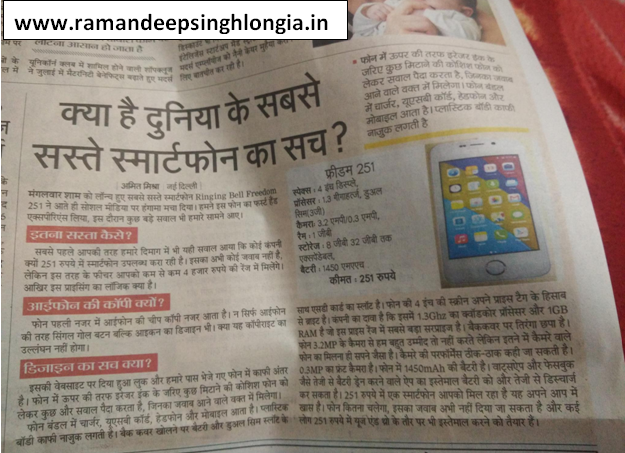
    Freedom 251 is a new phone which is launched by Indian government and the Freedom 251 phone has been launched under make in India scheme. Freedom 251 phone has been launched as Indian government is trying hard to make India Digital and let me tell you that the phone is pretty impressive. Freedom 251 phone is termed as world’s cheapest phone and let me tell you that Freedom 251 phone is priced at just rupees 251. If you talk about the configuration than let me tell you that Freedom 251 mobile gave 1 GB of ram and the phones supports 8 GB of memory. Freedom 251 phone has 4 inch display and I must say that the phone is fabulous. Freedom 251 has 3.2 megapixel rear camera and which is simply breathtaking in this price tag. More shocking thing is that the phones also possess 0.3 megapixel camera and the phone has 1450 mah battery. Freedom 251 has expandable memory of 32GB and I must say that the phone is tremendous and I must appreciate the efforts of Indian government. Freedom 251 phone is launched to make India digital and let me tell you that the phone is simply superb and I would say that this deal is a once in a lifetime deal and I will say that do not miss this deal at otherwise you will regret. Freedom 251 phone can be booked via Freedom 251 website. So what you are waiting for? Do go and book you phone.

    Freedom 251 Full Phone Specification & Price Details & Booking Site:

    Android: 5.1 Lolipop

    Battery: 1450 mAh

    Screen Size: 4 Inch

    Processor:  1.3 Ghz Qad Core

    Price: 251 Rs.

    Website To Book Freedom 251: www.freedom251.com

    How To Book Freedom 251 Phone

    1. Goto www.freedom251.com
    2. Select Quantity and Fill Particulars
    3. Now Select the Payment Method For Booking Freedom 251 E.g. Debit Card, Credit Card & Net Banking etc.

    Freedom 251 Price, Features and specifications – Ringing Bell Launched World’s Cheapest Smartphone